
Set up a custom domain
A custom domain is a personalized web address (e.g. johndoephotography.com) that helps you establish a professional online presence.
You can connect a custom domain to Mosawer on any paid plan by pointing your domain's DNS records to Mosawer. Your domain continues to be registered and hosted by your domain provider.
Before you begin
- Make sure you have a third-party domain with full access to its DNS settings. If you don't own a domain, you'll need to purchase one from a domain provider (e.g. GoDaddy, Namecheap) before continuing.
- Your domain must remain hosted by your domain provider to stay connected to Mosawer. You are connecting your domain, not transferring it.
1. Generate instructions
- In Mosawer, click your avatar in the dashboard, then Settings → Domain.
- Select Custom domain and enter your domain in the field.
- Click Read instructions. You'll see the CNAME record to add for your custom domain — and if needed, an additional A record.
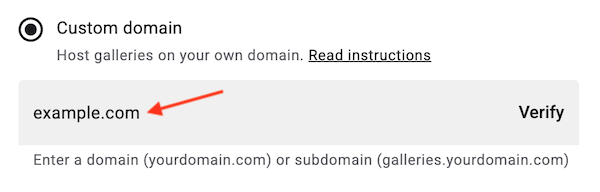

2. Add the DNS record(s) in your domain provider
- Log in to your domain provider's dashboard and locate your DNS records. This section is usually called DNS Settings, but it may also appear as DNS Manager, Zone File Settings, Domain Manager, or something similar.
- Add a new CNAME record — and an A record if required — using the properties shown in the Mosawer instructions panel.
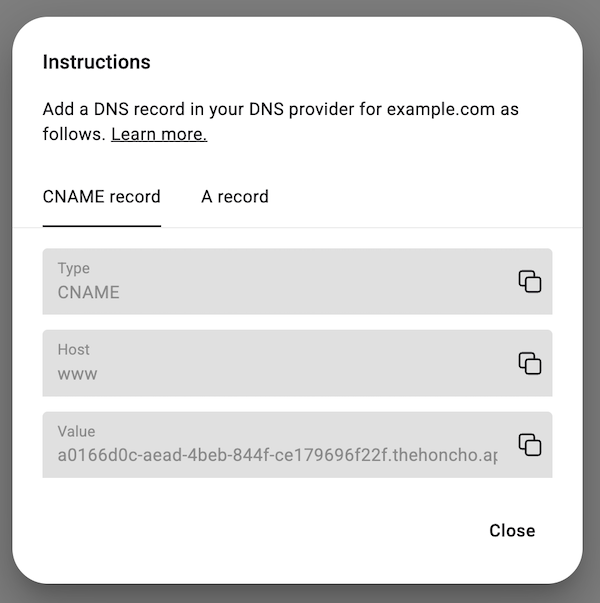
You don't need to change the TTL number in your DNS settings — use the default value.
You can have multiple CNAME records as long as each uses a unique host (e.g. www or gallery). If a CNAME already exists with the host required for Mosawer, update it to point to Mosawer.
If an A record already exists, delete it and create a new one that points to Mosawer.
3. Verify the record
- In Mosawer, click Verify in the custom domain field.
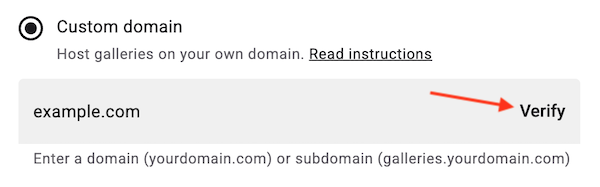
Your custom domain is now connected to Mosawer. Please note it may take up to 48 hours for DNS changes to fully propagate.