

Album settings
Open the album and tap Settings. Each tab controls one part of the gallery:
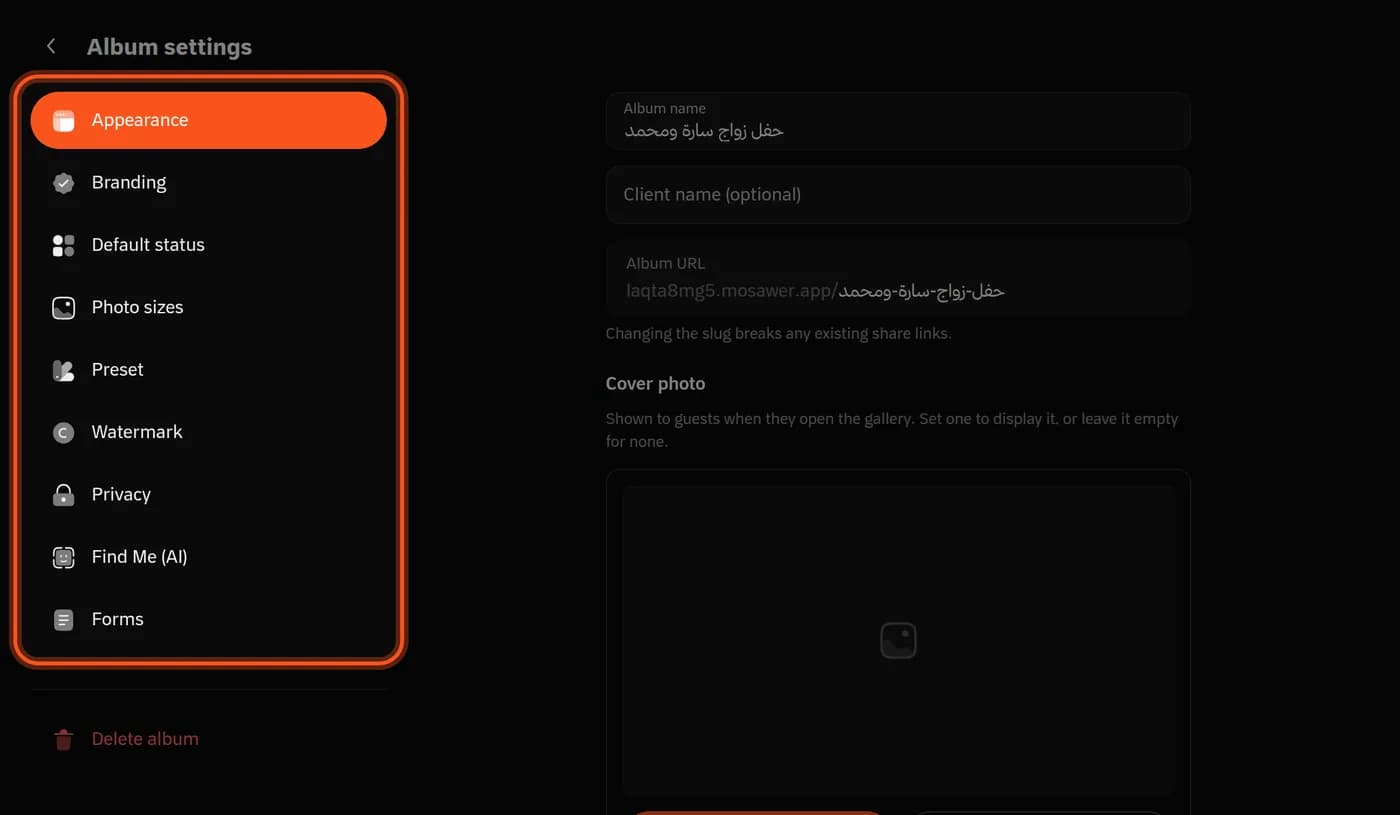
- Appearance: the album's name, the client's name, the link and the cover photo. Changing the link stops earlier share links from working.
- Branding: your profile in the gallery, with your bio and contact details. Hiding Mosawer branding, for your whole account, is on Pro and Studio.
- Default status: whether photos show as soon as they upload, or stay Unpublished until you publish them.
- Photo sizes: the size photos are stored at when uploaded, and whether guests download them in high resolution or web size, or the gallery is view only.
- Preset: an edit applied to every photo you upload. Guide
- Watermark: your logo on the copies guests see. Guide
- Privacy: a gallery password, and blur. Guide
- Find Me (AI): solo photos only, and pay to reveal. Guide
- Forms: a form that collects information from guests when they open the gallery or download, mandatory or optional. The answers are in Analytics.
For every new album
Photo sizes, Preset, Watermark, Find Me (AI) and Forms end with Save these settings for all new albums. Existing albums don't change.
Last updated: October 27, 2026